Duplicate Payments: How to Detect and Prevent Them
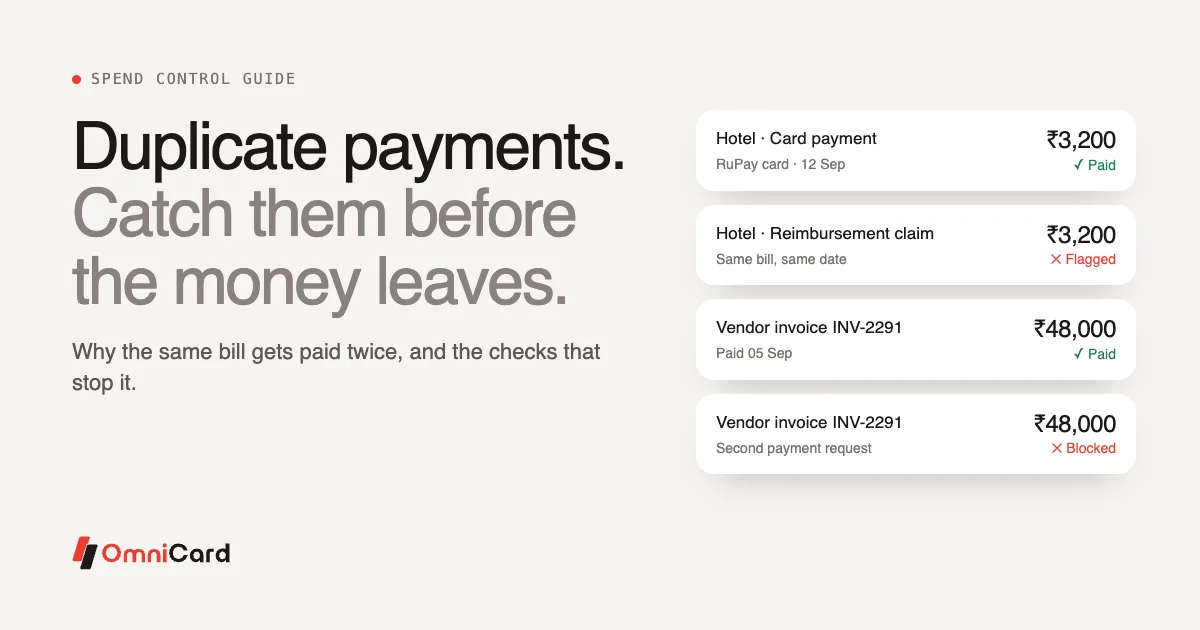
A duplicate payment is when a business pays for the same thing more than once: the same vendor invoice paid twice, the same bill claimed twice, or the same spend paid on a company card and then claimed again as a reimbursement. Each one is money that has left the business for nothing in return.
Duplicates are rarely fraud. Most come from ordinary gaps in process: two people handling the same bill, a claim filed on paper and again in an app, or an invoice that arrives by email and by courier. This guide explains the common types, why they happen, how much control each fix gives you, and how duplicate expense detection catches what slips through.
Types of duplicate payments
| Type | What it looks like | Where it usually happens |
|---|---|---|
| Vendor invoice paid twice | The same invoice is entered and paid twice, sometimes with a slightly different invoice number or date | Accounts payable |
| Same bill claimed twice | An employee submits one bill in two claims, or two employees claim the same shared bill | Reimbursements |
| Card plus reimbursement | Spend paid on a company card or UPI is also claimed as out-of-pocket | Cards and reimbursements run in separate systems |
| Split and re-claimed | One bill is split across claims or periods, and part of it is claimed again | Travel and team expenses |
| Recurring bill paid twice | A utility or subscription bill is paid by the branch and by head office | Multi-branch businesses |
Why duplicate payments happen
The same document enters through two doors. A vendor emails the invoice and also sends a paper copy. An employee uploads a bill and later attaches it to a travel claim.
Records live in different places. When card spend, UPI spend and reimbursement claims sit in separate tools, nobody can see that a ₹3,200 hotel bill on the card was also claimed by the employee.
Small differences hide a match. "INV-1045" and "INV1045", a date typed as 03/04 instead of 04/03, or an amount that includes GST in one entry and excludes it in another. Exact-match checks miss all of these.
Volume and time pressure. Reviewers approving hundreds of claims at month-end check the amount and the category, and move on.
Decentralised payments. When branches, stores and head office can all pay the same kind of bill, the same bill can be paid twice. Our guide to a spend approval process covers how to assign who pays what.
The cost goes beyond the amount
The direct loss is the duplicate amount itself. Recovering it adds more cost: someone has to find the error, contact the vendor or employee, and pass reversal entries. Vendors may adjust a credit against future invoices instead of refunding, which keeps the error open for months. Where GST is involved, input tax credit claimed twice on one invoice has to be reversed, which creates work at return time. See our GST guide for the basics.
How to prevent duplicate payments: fixes compared
Not every fix gives the same level of control. The strongest controls stop a duplicate before money moves. The weakest find it after.
| Fix | When it acts | Level of control | Limitation |
|---|---|---|---|
| Manual review by approvers | Before approval | Low | Depends on the reviewer spotting it; fails under volume |
| Unique invoice number rule in the ERP | At entry | Medium | Misses near-matches and changed numbers |
| Periodic duplicate audit (monthly or quarterly) | After payment | Medium | Money is already gone; recovery needed |
| Company-paid spend instead of reimbursements | At payment | High | Removes the card-plus-claim duplicate by design |
| Pre-payment policy checks | Before money moves | High | Needs payments to run through a platform that checks policy at authorisation |
| Automated audit that flags duplicates and anomalies | Continuously, before posting | High | Needs all spend in one place to compare |
The strongest protection comes from combining them: fewer claims, rules checked before payment, and an automated audit on everything that remains.
How duplicate expense detection works
Duplicate expense detection compares each new bill, claim or payment against what already exists and flags likely matches for a person to review. Good detection looks at more than one field:
- Amount, including amounts that differ only by tax or rounding.
- Merchant or vendor, including different spellings of the same name.
- Date, within a window, since the same bill may be entered days apart.
- Invoice or bill number, allowing for small formatting changes.
- The bill image itself, since OCR can read the same details from two uploads of one receipt.
- Payment method, to catch spend on a card or UPI that is also claimed as out-of-pocket.
A flagged item is not always a duplicate. Two identical ₹500 lunches at the same restaurant on the same day may be genuine. That is why detection should flag items for a person to review, and leave the decision to them.
Anomalies worth flagging alongside duplicates
The same checks can surface related patterns: claims just under an approval limit, spend at unusual times or locations, round-number bills that repeat, or a sudden rise in one employee's spend in one category. These are signals to look into. Many will have a simple explanation.
Pre-payment checks plus audit: how OmniCard handles it
OmniCard approaches duplicates at two points.
Before the money moves. On OmniCard, employees pay business expenses by @omni UPI or OmniCard RuPay card from company funds, with limits by employee, category, merchant, location and time checked before the payment goes through. A restricted payment is declined at authorisation. Because the company pays directly, the most common duplicate, card spend claimed again as a reimbursement, has much less room to happen.
After payment, before the books. OmniCard Intelligence runs AI agents across spend, including an Audit agent that flags duplicates and anomalies, and a Receipt/OCR agent that reads bills and matches them to payments. Flagged items go to finance for review before the Reconciliation agent posts entries to the ERP.
For claims that remain. When an employee does pay personally, Reimburse360 handles the claim with OCR bill capture, one-tap approvals and auto-settlement, on the same platform as card and UPI spend. Keeping cards, UPI and reimbursements in one place means there is one set of records to check against.
A simple checklist to reduce duplicate payments
- Move repeatable spend to company-paid cards and UPI so fewer claims exist.
- Require a bill image for every payment and claim.
- Assign each recurring bill to one payer: a branch or head office, never both.
- Check invoice numbers with fuzzy matching that allows for small formatting differences.
- Run duplicate and anomaly checks before posting, in addition to any periodic audit.
- Review flagged items within the week, while the context is fresh.
- Track recovered duplicates as a metric, so the trend is visible.
For more on the claims side, read our guide to expense reimbursement.
Frequently asked questions
What is a duplicate payment?
It is a payment made more than once for the same invoice, bill or expense. Common examples are a vendor invoice paid twice, one bill claimed in two reimbursement claims, and spend paid on a company card that is also claimed as out-of-pocket.
How do duplicate payments happen?
Usually through process gaps: the same document arriving through two channels, records kept in separate systems, small differences in invoice numbers or dates, and reviewers working under time pressure at month-end.
What is duplicate expense detection?
It is a check that compares each new bill, claim or payment against existing records on amount, merchant, date, bill number and payment method, and flags likely duplicates for review.
How do you recover a duplicate payment?
Contact the vendor or employee with the evidence and ask for a refund or an adjustment against a future invoice or payout. Record the reversal in your books, and reverse any GST input tax credit claimed twice.
Can duplicate payments be prevented completely?
Most can. Paying expenses directly from company funds removes the card-plus-reimbursement duplicate, pre-payment checks stop out-of-policy spend, and an automated audit flags what remains before it reaches the books. A person still reviews flagged items.
Catch duplicates before they reach the books
Checks at the moment of payment, plus an audit on every transaction, stop most duplicates early. See how OmniCard Intelligence works, explore Reimburse360, or book a demo.