What is Expense Management? A Complete Guide for Businesses
We have all felt the dread of a wallet full of fading receipts and a deadline to submit a reimbursement report. For a business, this isn't just a minor annoyance—it is a financial risk. This guide simplifies the process of tracking spending and shows you how to turn messy paperwork into clear, actionable data.
What to Expect From This Blog?

The Lifecycle: How a single purchase moves through your company.
Hidden Costs: Why "free" spreadsheets actually cost you money.
Policy Building: How to set fair rules for employee spending.
Fraud Prevention: How to spot and stop common errors or misuse.
Modern Tools: How OmniCard’s expense management solution automates the hard work.
The 4-Step Journey of an Expense

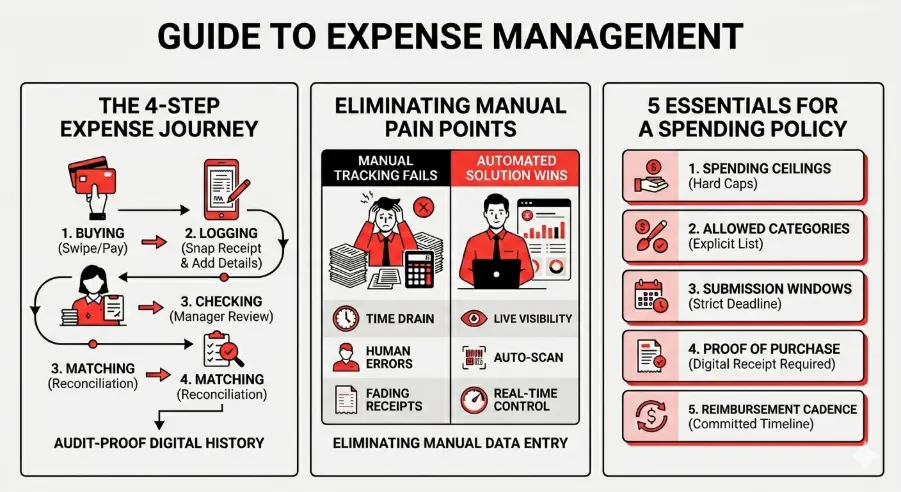
Every time an employee spends money for work, a specific process begins. To stay compliant with tax laws and keep your bank balance accurate, every transaction must follow these steps:
| Stage | What Happens? | Why It Matters |
|---|---|---|
| 1. Buying | An employee pays for a business-related item. | The starting point of the financial trail. |
| 2. Logging | The employee takes a photo of the receipt and adds details. | Turns a piece of paper into digital data. |
| 3. Checking | A manager reviews the spend against company rules. | Prevents overspending before the money is gone. |
| 4. Matching | Finance matches the report to the bank statement. | The "truth check" that ensures records are perfect. |
OmniCard makes this journey faster by capturing the details the moment a payment is made, so you don't have to hunt for receipts weeks later.
Why Manual Tracking Fails
Many small businesses use spreadsheets because they seem free. However, manual tracking has hidden dangers:
Time Drain: Managers spend hours typing data instead of growing the business.
Human Errors: A simple typo (like ₹100 instead of ₹10) can ruin your monthly report.
Data Gaps: You only see how much money you have at the end of the month, not in real-time.
Lost Proof: Thermal receipts fade or get lost, leaving you unprotected during a tax review.
5 Essentials for a Fair Spending Policy
A clear policy removes guesswork. It tells your team exactly what they can spend, which keeps everyone on the same page.
Spending Limits: Set clear caps (e.g., ₹500 for a meal).
Approved Items: List exactly what the company will pay for (e.g., travel, software, supplies).
Deadlines: Require all receipts to be submitted within a set window (e.g., 15 days).
Proof Needed: Define which purchases require a physical or digital receipt.
Payback Time: Tell employees exactly when they will be paid back to build trust.
Protecting Your Profit from Mistakes and Fraud
Tracking spending isn't about lack of trust; it is about accuracy. Small leaks can add up to huge losses over a year.
Common issues to watch for:
Double Submissions: Using the same receipt for two different reports.
Inflated Totals: Rounding up cash costs or adding fake tips.
Personal Costs: Labeling a personal meal as a business meeting.
Using a system like OmniCard helps prevent these issues. The software acts as an automatic auditor, flagging duplicate receipts or spending that goes over your set limits before you even hit "approve."
Choosing the Right Technology
Modern software does the heavy lifting for you. When looking for a solution, prioritize these three features:
Auto-Scan: The app should "read" receipts using your phone camera so you don't have to type.
Live Updates: You should see spending the second it happens, not weeks later.
Easy Approvals: Managers should be able to approve or reject costs with one click.
OmniCard’s expense management solution is built to handle these needs for Indian businesses. It connects the way you pay (via UPI or Card) with the way you track, making sure every rupee is accounted for automatically.
Your Monday Morning Action Plan
Check Your Flow: Follow one receipt from the store to the bank to see where it gets stuck.
Write the Rules: Create a simple, one-page guide on what is okay to buy.
Ditch the Cash: Move away from cash-based spending to gain better visibility.
Try Automation: Use a platform like OmniCard to see how much time your team saves.
Book a Demo with OmniCard today!
Frequently Asked Questions (FAQs)
- How does OmniCard’s RBI PPI license benefit my business?
OmniCard is a licensed RBI PPI (Prepaid Payment Instrument) provider. This means your company funds are handled with bank-grade security and full regulatory compliance. For businesses, this license allows for the issuance of secure corporate cards and digital wallets that offer far more control and safety than traditional cash or standard bank accounts.
- How does an automated system prevent double-spending?
Automated tools use digital "fingerprints" to scan every receipt. If an employee tries to upload the same bill twice, the system flags it instantly as a duplicate, preventing the company from paying twice for the same item.
- Is digital receipt storage enough for tax audits in India?
Yes. Modern digital records that include a clear image of the receipt, the transaction date, and the business purpose meet compliance standards. Transitioning to a digital system ensures your evidence never fades or gets lost in a physical file.