Spend Management for Accounting Firms Managing Client Expenses

We have all seen it: a client drops off a shoebox stuffed with crumpled, faded receipts just 3 days before a tax deadline. In practice, sorting through this chaos creates massive hidden labor costs for professionals. Chasing down missing paperwork is like waiting for a letter in the mail, hoping the critical details eventually arrive so you can balance the books.

What to expect from this blog?
In this article, we will dive deep into the digital transformation of expense management. We will explore:
How proactive spend control prevents budget overruns before they happen.
The role of OCR technology in eliminating manual data entry.
Why smart corporate cards like OmniCard offer superior oversight compared to traditional credit.
Strategies for syncing spend tools with QuickBooks and Xero for a seamless "2-way" data flow.
A 30-day roadmap to transition your firm from reactive bookkeeping to high-value advisory services.

Accounting used to be entirely reactive, meaning you only looked backward at the money that was already spent. Today, modern spend management softwares like OmniCard flips this script. Instead of hunting for clues weeks later, these platforms create a continuous digital stream where purchases are tracked and categorized the exact moment a card is swiped. Think of this shift like moving from slow physical mail to receiving an instant text message. According to industry surveys, eliminating manual data entry in bookkeeping saves firms hundreds of hours every quarter. By capturing data instantly, accountants gain real-time visibility into client cash flow, transforming the stressful tax-season scramble into a smooth, year-round advisory relationship.
Why Controlling Spend Matters More Than Just Recording It?
Under traditional backward-looking models, if a team member bought overpriced software, you simply logged the financial damage weeks later. Today, modern financial management solutions allow businesses to stop mistakes before they happen by shifting from passive recording to active spend control.
Think of spend control as placing a guardrail around your budget rather than just recording when you drive off the cliff. By using expense policy templates, accountants help owners set clear purchasing rules. Instead of waiting for a surprise bank statement, these rules guide behavior immediately.
That immediate guidance happens through digital approval flows. Imagine this tool as a manager physically initialing a paper purchase request, except it happens instantly on a smartphone. When paired with budget locking—a feature that automatically declines a transaction if it exceeds a pre-set limit—client overspending becomes nearly impossible. Offering this proactive level of spend management elevates simple bookkeepers into strategic advisors.
Comparison: Traditional vs. Modern Spend Management
| Feature | Traditional Bookkeeping | Modern Spend Management (e.g., OmniCard) |
|---|---|---|
| Data Entry | Manual typing from physical receipts | Automatic OCR extraction & matching |
| Visibility | 30+ days delayed (Bank Statements) | Real-time (Instant notifications) |
| Policy Control | Reactive (Finding errors after spend) | Proactive (Declining out-of-policy spend) |
| Audit Readiness | Missing receipts & manual filing | Digital receipts attached to every line item |
| Subscriptions | Hard to track/cancel | Virtual cards with merchant-specific limits |
Turning Paper Into Data: How OCR Technology Eliminates Manual Entry
Deciphering smeared ink on faded coffee receipts right before tax season is a notoriously frustrating task. Modern expense tracking software solves this by introducing "photo-and-forget" compliance, built on OCR (Optical Character Recognition) technology. Think of OCR as a digital translator that reads images and turns them into text automatically, saving your clients from hoarding physical scraps of paper.
Rather than typing numbers into a spreadsheet, clients simply use their smartphones. The software takes over in three simple steps:
Capture: The client snaps a photo of the receipt right at the register.
Extract: OCR technology acts like a smart scanner, instantly pulling the date, vendor, and total amount.
Match: The system automatically pairs those details with the correct bank transaction.
Shifting from tedious typing to simply reviewing automated matches is a game-changer for reducing manual data entry in bookkeeping. Before this system, you might waste hours chasing down missing details; now, the data practically manages itself. But what if you could connect this clever scanning directly to the payment method? That is exactly why smart corporate cards are better for your clients than traditional credit.
Why Smart Corporate Cards Are Better for Your Clients Than Traditional Credit
Everyone knows how standard credit cards work: you swipe, wait for the statement, and hope everything matches. Today, the best corporate cards for small business clients flip this model upside down by offering virtual cards. Think of a virtual card as a unique, software-generated number that lives purely on a screen rather than in a physical wallet.
Because these cards connect directly to your spend software, they give you proactive control over budgets. Platforms like OmniCard allow you to issue these virtual cards for recurring client subscriptions, where you can set merchant-specific limits. This means a card approved only for a $50 software fee automatically declines an unexpected $100 charge. Furthermore, real-time transaction alerts notify you instantly when money is spent, completely eliminating the month-end surprise.
Upgrading to these smarter options fundamentally changes how money is managed:
Instant visibility: See purchases immediately instead of waiting weeks for a bank summary.
Built-in guardrails: Stop overspending right at the register with strict, pre-set limits.
Vendor locking: Prevent subscription bloat by tying a virtual card to one specific merchant.
Smoother processes: Replace messy spreadsheets with automated expense reimbursement workflows.
Providing this level of proactive control keeps client budgets safe and your bookkeeping accurate. However, capturing the data perfectly at the point of sale is only the first step. To finish the puzzle and eliminate manual entry entirely, these spend tools must connect seamlessly with your core accounting platform.
How to Connect Spend Tools with QuickBooks and Xero
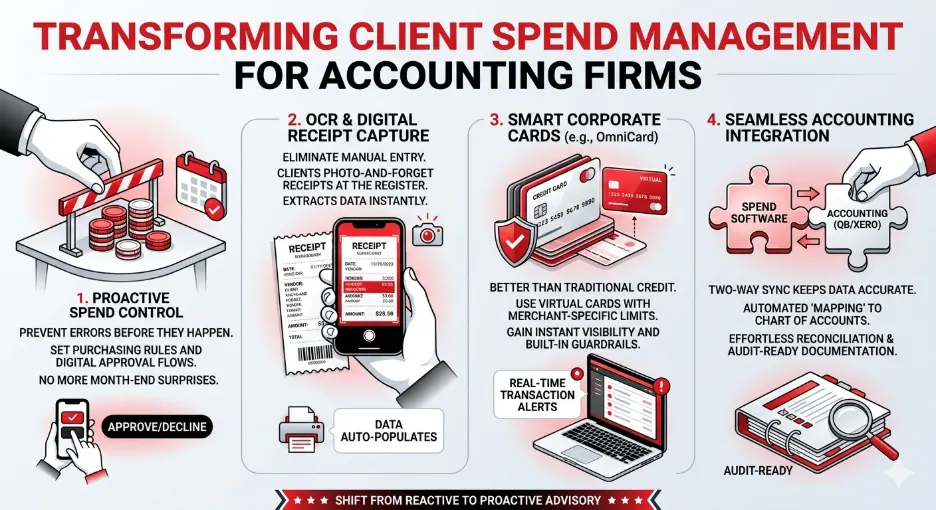
Capturing data at the register is great, but the real magic happens when moving it into your accounting system. When integrating spend management with QuickBooks and Xero, you need a true "two-way sync." Unlike a basic one-way push that just dumps data into a ledger, a two-way sync talks back and forth. If you update a vendor name in QuickBooks, it updates your spend tool instantly.
This constant communication enables automated "mapping" to your Chart of Accounts. Instead of manually assigning every coffee receipt to "Meals and Entertainment," the software learns the vendor and routes the expense perfectly without human intervention.
Think of automated reconciliation like a self-assembling puzzle. The software instantly matches the digital receipt, the chosen category, and the bank record together automatically. Because every approval note is digitally pinned to the transaction, you effortlessly generate audit-ready expense documentation that keeps clients protected.
Eliminating this manual data entry clears the path for offering higher-value advisory services. To ensure your foundation is solid—especially when handling multi-entity spend management—use this healthy software integration checklist:
Confirm two-way syncing capabilities with your specific accounting platform.
Build default category rules for the most frequently used vendors.
Verify that receipt images automatically attach to synced ledger entries.
Transitioning to Advisory: Using Spend Dashboards to Offer Higher-Value Services
Once accounting software handles the tedious manual data entry, your role naturally evolves from a record-keeping historian into a forward-looking financial coach. Stepping into this new advisory position starts with utilizing a centralized dashboard for client financial management.
Think of this tool as a mission control screen showing a client’s real-time spending habits. It allows you to instantly spot trends—like duplicated software subscriptions or rising supply costs—and suggest proactive cost-saving measures before the month even ends. Tools like OmniCard provide this bird's-eye view, making it easy to see where every dollar is going across different departments or projects.
Catching those runaway expenses gives you the perfect opportunity to establish spending rules that teams actually follow. Instead of handing a business owner a boring policy document, you can bake limits directly into their corporate cards. If someone attempts an unapproved purchase, the card simply declines. This built-in control focuses on improving client compliance with expense reporting automatically, saving your clients money while removing the awkward friction of manual manager approvals.
Delivering this level of strategic guidance doesn't require working longer hours or hiring more staff. Because the automated system handles the everyday busywork, you can easily offer scalable advisory services for expense management to your entire client roster. You just review the data, share your valuable insights, and confidently guide your clients toward an audit-ready future.
Creating an Audit-Ready Future: 3 Steps to Start Modernizing Your Firm Today
You no longer have to dread the shoebox of faded receipts at tax time. By mastering spend management software, you can transition from a data-entry clerk into a proactive financial guide. Replacing manual tracking with digital controls stops overspending before it happens and eliminates end-of-month panic.
To beat analysis paralysis and finalize your business case away from manual bookkeeping, follow this simple 30-day roadmap:
Days 1-10: Pick a pilot client. Choose one business struggling with lost receipts to test your new process using a platform like OmniCard.
Days 11-20: Choose your partner. Find expense tracking software featuring easy receipt scanning and automated bank matching.
Days 21-30: Map the workflow. Plan exactly how to streamline client bill pay using digital approvals instead of chasing physical signatures.
Start with that single pilot client to see immediate results. Each time you set up these smart rules, you will build confidence in the system. You now understand this digital shift well enough to free your team from manual data entry and focus entirely on strategic growth.
Frequently Asked Questions
- How does spend management software differ from standard business banking?
Standard banking is reactive; you see what was spent after the fact. Spend management software allows you to set rules before a purchase is made. For example, with OmniCard, you can set a specific budget for a virtual card that cannot be exceeded, effectively preventing overspending rather than just recording it.
- Is OCR technology 100% accurate for all receipts?
While OCR is incredibly advanced, factors like extremely faded ink or physical damage can occasionally cause errors. However, it typically reaches 95%+ accuracy. The major benefit is that it pulls the heavy lifting—date, vendor, and amount—leaving the accountant to only perform a quick 5-second verification rather than 2 minutes of typing.
- Will my clients find it difficult to switch to virtual cards?
Most clients find virtual cards easier because they don't have to carry physical plastic or share one card number among multiple employees. They can generate a specific card for a specific vendor (like Amazon or Google Ads), which actually increases their security and simplifies their internal bookkeeping.